EZ2DEMOSCENE
Make loopable, stylised 3D scenes the demoscene way, without writing code.
| Written in | Rust |
|---|---|
| License | GPL-3.0 |
| Latest release | v1.1.0, 7 Oct 2026NEW! |
| Last updated | 7 Oct 2026 |
Make loopable, stylised 3D scenes the demoscene way, without writing code.
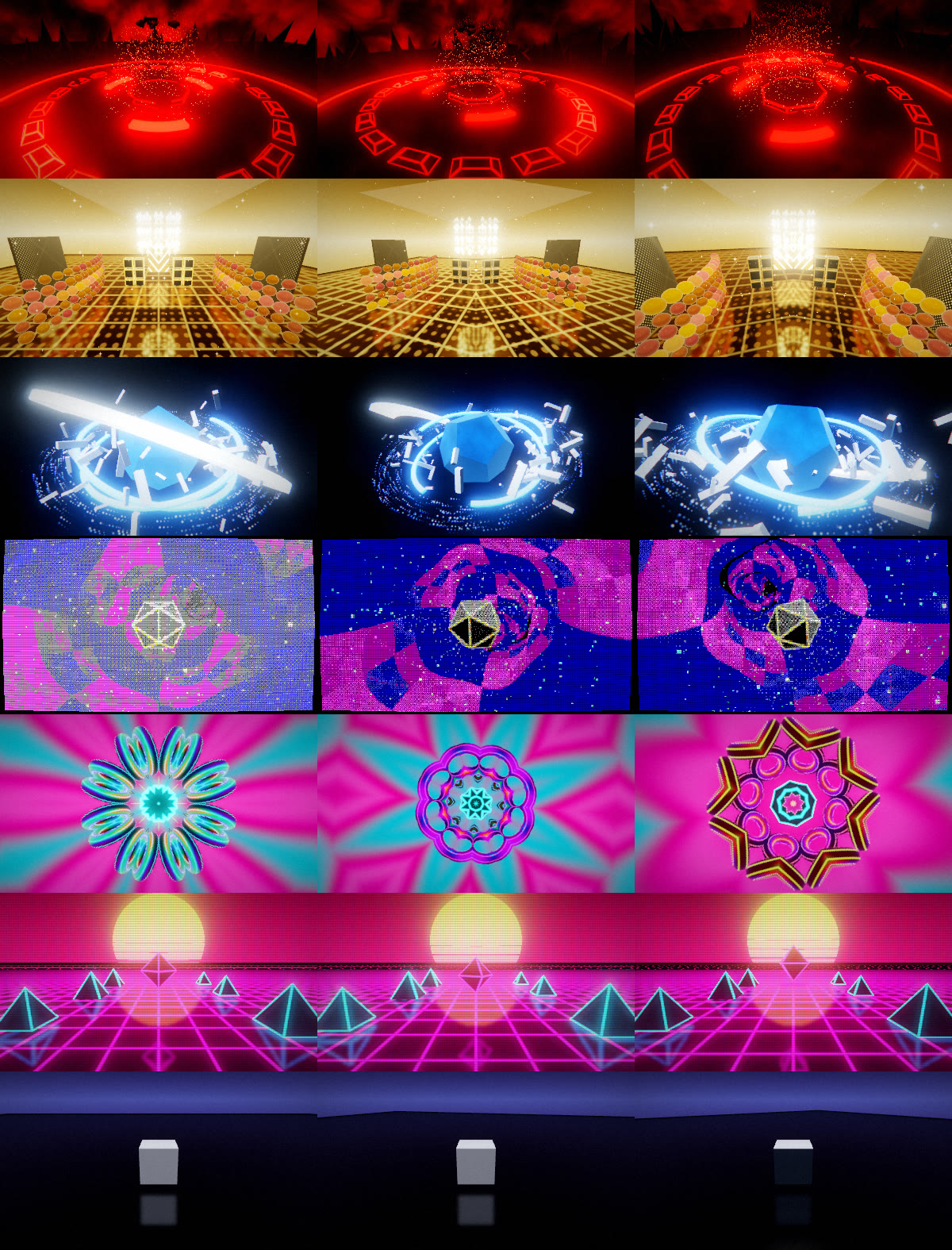
EZ2DEMOSCENE is a desktop app (Windows, Linux and macOS), a web app and an Android app for building short, seamless 3D loops: neon arenas, mirrored golden halls, glossy solids orbited by debris, raymarched tunnels, plasma kaleidoscopes and synthwave sunsets. You start from a preset, tweak layers with sliders, press Export and get an MP4, WebM, GIF or PNG sequence that loops with no visible seam.
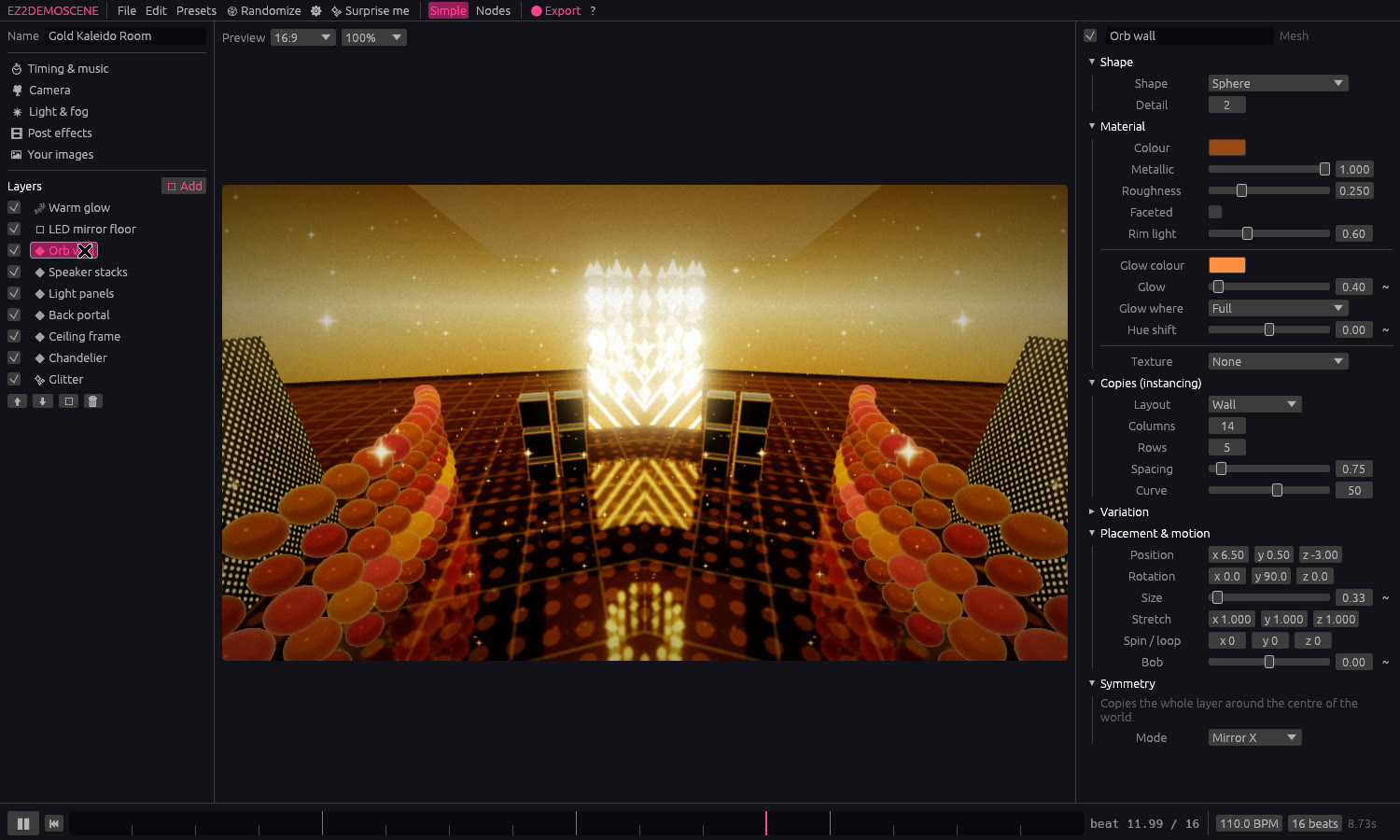
📖 User manual (PDF): a beginner's guide to every feature, with a quick start and recipes. The source is docs/manual/USER_MANUAL.html.
Features
- Seamless loops. A loop is a whole number of beats at a chosen BPM. Every animation (spins, orbits, pulses, particles, scrolling textures, cloud drift, grain) runs an integer number of cycles per loop, so frame N equals frame 0. The test suite checks this for every preset.
- Presets + layers for beginners.
- Backgrounds: gradient sky, nebula, starfield, oldschool plasma, synthwave sun & grid, and four raymarched ones with their own settings: tunnel (5 shapes, wall patterns, twist, light rings), fractal (3 formulas, fold, zoom), Menger sponge flight (sponge, beam lattice, cube field) and a ring corridor. Plus two skies: volumetric clouds (raymarched, sun-lit, fluffy / overcast / storm) and an aurora night sky. And a battle background in the style of 16-bit RPGs: two tiled patterns (rings, diamonds, zigzags, bricks, plasma, your picture…) scrolling and wobbling line by line (wave, interlaced, compression) while the colours cycle through them.
- Mirror floor: real planar reflections, blur, a glowing neon grid and LED textures.
- Shapes: 25 built-ins (platonic solids, crystals, shards, beveled tech panels, neon ring bands, tori, torus knots, springs, gears, stars, gems, hearts, a Möbius strip, a Menger sponge…), a library of about 1,000 low-poly models (spaceships, vehicles, trees, food, buildings, characters… by Kenney, CC0) picked from tiles with previews, and your own glTF/GLB, OBJ, STL, PLY, OFF and 3MF models.
- Cloth: flags, curtains, banners or a sheet draped over a ball, blown by a wind that can turn and gust on the beat. Position-based dynamics simulated ahead of time into a loop (like flocks), drawn as a shape with every material, texture, copy and shadow option.
- Morph: any shape or model melts into another like liquid (holes open and close, parts bud off), with an animatable amount.
- Copies (instancing): grid, radial, scatter, orbit swarm, curved wall, spiral. Each has random tilt, size and hue, plus size waves and light chases that travel across the copies.
- Symmetry: mirror X/Z/XZ, radial and kaleidoscopic duplication.
- Particles: burst, drift, ring orbit, fountain, warp stars, vortex and glitter, with trails. They are fully deterministic on the GPU, so scrubbing and exports are exact.
- Terrain: an endless wireframe or solid (optionally textured) landscape that scrolls past and repeats exactly every loop. Six shapes (hills, ridged mountains, mesas, dunes, canyons, craters), biomes that colour it by height and slope (alpine, desert, volcanic, arctic, alien), and water, lava, toxic goo or ice filling the low ground, with ripples, sun glints, foam, a churning crust or bubbles. Level of detail keeps full resolution near the camera with a quarter of the triangles.
- Text: still text, scrollers, sine scrollers, typewriters and greetings
lists, in a crisp pixel font, Mono, Sans or your own TTF/OTF, with
gradients, glow, outline, drop shadow and chrome (signed-distance
atlas). Logos can follow 3D layers: attached to a shape, a logo
stays against the area it covers on screen as the camera moves (a
label under a gem, a title above the moon). Numbers in text:
{0},{1}… show animatable numbers (padded, with decimals or thousands commas), for timers counting down, scores counting up or a combo following the music; logos too. Shapes can also be 3D text: extruded logos (voxel letters with the pixel font) with every material option. Raymarched shapes (metaballs, gyroid, fractal bulb, melting box) are drawn per pixel inside a box: smooth, depth-correct against everything else, with sun shadows and the usual material. - Gaussian splats: captured objects and places (3D Gaussian splatting) from PLY, SPZ or .splat files, drawn back to front as soft ellipses on every backend, WebGL2 included, and placed, spun and copied like any layer; animatable brightness, opacity, splat size and a scatter that bursts the scene apart on the beat.
- Sprites: billboards, upright or fixed image planes with alpha, additive or cutout blending and any copy layout; sprite sheets play a whole number of times per loop (built-in explosion, flame, coin and sparkle sheets). Animated GIFs and videos (MP4, WebM, MOV…) import as animations: image layers play them at their own speed, looped a whole number of times, and as a texture anywhere else they play by themselves (videos: the first 30 s, up to 240 frames; read with ffmpeg on desktop and by the browser on the web).
- Copies on the GPU: every copy layout (grid, ring, scatter, orbit, wall, spiral, curve, big swarms of up to 250,000 in orbits, a cloud, a shell or a spiral galaxy) is placed with its variation by a compute shader on desktop and WebGPU; WebGL2 runs the same maths on the CPU.
- Flocks (a copy layout): boids that keep apart, fly together and follow a target (still, animated, music-linked or travelling a curve), bank into turns and scatter on hits. Simulated ahead of time into a loop (on a thread; in the browser a slice per frame) with the same result on every platform: each boid keeps a loose place in a formation so the flight nearly repeats, and the end of the loop steers back to its start. Exports wait for the simulation.
- Physics (a copy layout): rigid boxes or balls. Rain drops them on a schedule that repeats every loop; they pile up, then shrink or sink away. Stack and blast builds a wall or tower that a blast knocks down on a chosen beat and that rebuilds itself (ping-pong); with no gravity it bursts apart in space. Simulated ahead of time, with the same result everywhere.
- Liquid (a copy layout): position-based fluid droplets in a box, a bowl or a pool, filled or poured in from a spout, sloshing as the layer tilts (a new animatable Tilt; the new Bowl shape rocks with it) and stirrable by the music. Drawn as droplets (any shape or glowing sprites) or as one smooth liquid surface in the layer's material; the loop closes by cross-fading. Liquid Gold rocks a bowl of molten gold.
- Logos: text or an image laid flat on the screen (snapped to a part of the screen or against another logo, which it then follows, like a photo editor's reference points; size and turn animatable), drawn before the post effects but after depth of field. The shape is baked into a signed distance field, so outlines, glow, drop shadows and a chrome bevel work on any image, at any size. Bevels (round, chiselled, stepped, pillow) lit by a light that can circle or follow the beat, material spheres (matcaps: gold, chrome, plastic, candy or your own) and a glint sweeping across a whole number of times per loop. Distance-field effects: rings rippling out from the edges, stacked outlines, a fake extrusion, dissolving with a burning edge, reveals (grow, edges first, wipe, circle) and morphing into another text or image. Rasters and distortion: copper bars, sine sway and bob, raster glitch slices and chromatic split. Retro looks: pixel blocks (animatable, to pixelate in), retro palettes with ordered dither and palette cycling, halftone dots, scanlines with phosphor stripes, and moiré. Logos meet the scene: glass letters bending what is behind them, god rays from the logo (or its shadow in the light behind), and echo trails.
- Electric arcs: tesla lightning between two points, to the nearest copies of a shape (jumping as they move) or copy to copy, crawling and re-striking a whole number of times per loop.
- Weather: rain with splashes, snow, rising embers, a sandstorm or fireflies in a box that follows the camera, and lightning bolts whose flash lights up the scene. Rain wets every surface (gloss, puddles with ripples); snow settles on everything facing up.
- Waterfalls of water, lava or goo, with foam, spray or smoke.
- Laser beams or hazy spotlight cones with pools of light.
- Particles can be smoke instead of glow, and there is a tornado emitter.
- Colour scheme: one key colour and a harmony rule (one hue, neighbours, opposites, split, triad, square) that every colour of the project follows. Each keeps its lightness (worked out in OKLCH) while its hue moves to the scheme; stored colours stay, layers can opt out, and the scheme can turn round the colour wheel a whole number of times per loop.
- Sun shadows (soft shadow map) and contact shadows on floors.
- Environment light (image-based lighting): shapes are lit and
reflect a panorama photo (a
.hdrfile), one of four built-in studios (softbox, overcast, sunset, neon room) or the scene's own background. The map turns (whole turns per loop), its brightest spot can become the sun with shadows, and a background can show it. Blurred for rough surfaces ahead of time (split-sum GGX, spherical harmonics for diffuse light); the Chrome Studio preset shows it off. - Reflections (screen-space): shiny shapes, water and rain puddles reflect what is around them on the screen, blending back to the environment where the screen runs out; the mirror floor keeps its own exact reflection. Half resolution, no history, so it loops.
- Light shafts: the fog (and mist) lit by the sun wherever the sun reaches it, so shapes and terrain cut dark bands through the haze, even with the sun off screen (marched through the sun shadow map). The Cathedral Light preset streams low sunlight between columns.
- Atmosphere: mist pooling in valleys, underwater caustics, a rainbow, and a day & night cycle with sunsets, stars and a moon.
- Laser beams: fans, rotating cones or scattered beams that sweep and strobe on the beat.
- Neon ribbons: glowing tubes along Lissajous, knot, figure-eight, wave or rose curves, with light pulses running along them.
- Blink / strobe on any layer: rhythmic or random blinking and beat flashes.
- Materials. Classic or physical shading (GGX highlights, split-sum reflections with multiple scattering, so rough metals keep their energy), clearcoat, sheen and glass, occlusion/roughness/metal and glow maps, and nine one-click presets (gold, copper, chrome, brushed steel, rubber, car paint, glass, velvet, ceramic). Translucency lets light shine through leaves, paper, wax or skin from behind, in its own colour; transparency blends a shape over what is behind it (animate it to fade shapes in and out). glTF models bring their own PBR material and pictures (Classic keeps the original fake studio reflections). Flat-shaded facets, rim light, and neon glow on the whole surface, along polygon edges (Tron look), in stripes, or from a texture. Relief adds bump maps, normal maps and real displacement (with subdivision). Glitch corrupts a shape's geometry (jitter, VHS slices, shatter) in loop-safe bursts.
- Retro PC textures. 33 built-in tileable textures (XOR, plasma, checkerboard, circuit, tech panel, LED grid, speaker grille, Win9x, copper bars, Sierpinski, Tron grid, Truchet, the C64 10 PRINT maze, Matrix rain, CRT phosphors…). Imported images can be retro-ized: downscaled, palette-reduced and dithered, and tiled mirrored so photos repeat without seams.
- Texture library. About 880 seamless CC0 textures picked from tiles with previews: 135 PBR materials (brick, wood, bark, metal, rock, paving, roofing, fabric, concrete, ground; by Poly Haven) that set a shape's colour, normal map and roughness/metal in one click, and 740 low-res textures (at most 64 × 64: brick, stone, wood, metal, floor tiles, roofs, liquids, patterns, blocks…; by Screaming Brain Studios and Kenney) for the retro look.
- Retro 3D (5th-generation consoles). Draw the whole 3D scene like a PlayStation: at 320 × 240, 256 × 224, 640 × 480 or your own size with native aliasing and square-pixel upscaling (text and logos can stay sharp), vertex snapping (the PS1 wobble), affine texture warp (reduced by subdividing, as PS1 games did), and per-material texture filters: nearest, bilinear without mipmaps and the N64's 3-point filter. Per-polygon 15-bit colour with 4×4 dither, N64 fog starting close to the camera and the N64 video blur (de-dither and soften), Saturn mesh transparency (checkerboard see-through shapes and sprites) and PS1 near-plane culling. One click turns on the PlayStation, Saturn, Nintendo 64 or Quake bundle.
- Quake features. Light styles (flicker strings from 'a' dark to 'z' bright, playing a whole number of times per loop) on the sun and ambient light, glows, sprites and particles; turbulent warp for water, lava and slime textures, terrain liquids and waterfalls; a two-layer scrolling sky; palette lighting (colormap) through our own 256-colour palette with fullbrights, or any retro palette; and solid square particles.
- Animate on steps. Any layer's motion (spins, copies, simulations, deform, sprite frames) can be held at 30, 24, 15, 12, 10, 8 or 6 fps, snapped to a whole number of steps per loop, while the camera stays smooth.
- Mode 7 floor. A SNES / Saturn VDP2 style endless textured plane with a hard horizon that turns and scrolls whole turns and tiles per loop (a race-track texture included).
- Whole-screen machine resolutions and palettes. The whole picture at a C64's 160 × 200 double-wide pixels, a Spectrum's 256 × 192, a Game Boy's 160 × 144 and ten more, on a 4:3 TV or with square pixels inside the machine's border colour (wide borders all round, or a letterbox, and ZX Spectrum tape-loading stripes with the picture arriving line by line in memory order), with its palette: NES, 1-bit, Virtual Boy red, and the Amstrad, Master System, Mega Drive and Amiga colour cubes join EGA, CGA, C64, Game Boy, PICO-8, Spectrum and VGA.
- Presets in five groups: Consoles & arcade, PC era, Home computers & handhelds, Demoscene and Engine showcases, from the Amiga ball and a C64 cracktro to Star Fox, Space Harrier, Virtua Racing, Quake, Elite, glenz vectors, a rotozoomer and a 1993 demo on a timeline.
- Post FX. Bloom, god rays (light shafts from the sun or the picture centre) with lens flare, heat haze, depth of field (auto focus, round bokeh), feedback trails (zoom/turn/hue-drifting echoes that still loop exactly), kaleidoscope, mirror split, chromatic aberration, pixelation, palette reduction with Bayer dithering (EGA, CGA, C64, Game Boy, PICO-8, Amiga copper, ZX Spectrum, VGA cube, phosphor), CRT scanlines/curvature/VHS wobble, line wobble (retro RPG wave, interlaced or compression), VHS tape (jittering lines, a torn tracking band, colour bleed, snow), ASCII art (picture colours or green/amber terminal), a fisheye lens (and its opposite), grading, vignette, grain and beat flash.
- Animate anything. Click
~next to almost any value, post effects included, to pick a shape: LFOs (sine, triangle, saw up/down, square), beat fades (pulse, exponential and linear fades in/out, swell) or random (sample & hold, smooth random, drunken walk). The ♩ menu syncs it to every beat, bar or loop, a live graph previews the curve, and it can follow the music. Layers can also shake on the beat. A once ramp changes a value one time and holds it (seven eases, from the start of each timeline clip): menus sliding in, a title dropping, a grade stamping down. - Scenes & timeline. Several scenes (each with its own layers, camera, light and effects) played by a timeline of clips with transitions: crossfade, wipe, iris, flash, glitch or a cut on the next kick. The whole timeline is the loop; each scene keeps looping inside its clips. With a song, clips can follow its sections (drops, breakdowns).
- Camera. Orbit, pendulum, static or a path: a smooth closed flight through your own shots (position, look-at, field of view, roll) at an even speed, with optional lingering, cuts to the next shot on every kick, and a punch-in zoom on hits. The viewport draws the flight.
- Music. Drop in an MP3/WAV/OGG/FLAC. It is analysed once: loudness,
kick, bass, mids, highs and brightness, hits (kicks, snares, hats,
onsets, notes), a 16-band spectrum, the melody's note and the tempo.
The analysis runs in the background, so the editor never freezes.
- Any value can follow a source or play a fade on each hit (the
🎵 row of its
~panel), e.g. glow on every kick, hue from the melody. - Time warp makes motion surge with the music while the loop still ends where it started.
- Equalizer copies grow with the spectrum bands.
- Loop a window of the song (seamless, snapped to the detected tempo) or run through the whole song; video exports mux the matching audio.
- MIDI files give exact drum hits and melody; live input (microphone / line-in) drives the preview for VJ sets.
- Live channels: named values and hits that another program feeds while the project plays (a controller, a game, OSC glue). Declare them in Timing & music, link any value to one in its 🎵 row like the kick, and try them with the preview's sliders and hit buttons. A time warp can follow a value channel, and changing a channel between values and hits turns its links with it. Exports see them silent, so they stay repeatable.
- Any value can follow a source or play a fade on each hit (the
🎵 row of its
- Randomize / Surprise me. Seeded, harmonious mutations (one global hue rotation, bounded counts, loop-safe motion), and every change can be undone.
- Node graph (advanced mode). Source layers flow through modifiers
(Symmetry, Array, Spin, Offset, Scale, Tint, Jitter, Mirror, Strobe,
Colour/material, Merge) into Output. The
graph compiles to the same layer list the simple mode uses, and Bake to
layers brings it back into simple mode.
- Shape and layout nodes: Deform (twist, bend, taper, wobble, explode, in the vertex shader), Colours across copies (gradient or steps, travelling along them), and layouts that take a second reference input: Along a curve (follow a ribbon), On a surface (spread evenly over another shape) and On a terrain (stand on the landscape, riding its scroll; the height field is ported to the CPU). All of these are in Simple mode too.
- Signals: green wires carry a number that changes over the loop. Wave/music, Math, Remap, Quantize, Smooth, Mix, Sequence and Hit counter nodes (each with a live graph of its value) feed Drive nodes, which set any setting of the layers flowing through them (replace, add or multiply). Loop-safe by construction.
- Project files. Readable
.ez2.jsonfiles. Static values are saved as plain numbers, and assets inside the project folder are stored with relative paths, so projects can be moved. - Packs. A
.ez2packis one zip file holding a project plus every model, image and music file it uses, for sharing or archiving. - Autosave & crash recovery. Unsaved work is autosaved every 30 s and offered back after a crash.
- Your library. "Save as my preset" (with a thumbnail) and "Save layer as template" keep your own building blocks across projects.
- Viewport gizmos. Click to select, then drag handles to move, rotate or scale (W/E/R). Hold Ctrl to snap, and press G for the ground grid.
- Performance meter. Shows fps, triangle and particle counts, the most expensive layers, and a ⚠ on heavy layers. Static copies are cached.
Downloads
Latest release: v1.1.0 (Windows, Linux, macOS and Android builds; see the changelog). The links below are rolling builds of the newest code.
-
Web app: https://roganis.github.io/ez2demoscene/. Runs in Chrome, Edge or Firefox on desktop and in Chrome on Android. It can be installed as a PWA and works offline after the first visit.
-
Android APK: built by
.github/workflows/android.ymlon every push.- Newest build of
main: theandroid-latestprerelease. - Newest build of a work branch: the
android-previewprerelease. - Every run also keeps the APK as a workflow artifact, and tagged releases attach it (plus a signed release APK when the signing secrets are set).
- Newest build of
-
Desktop (Windows, Linux, macOS): built by
.github/workflows/release.yml.- Newest build of
main: thedesktop-latestprerelease. - Tagged releases (
v*) attach the same archives. - The Windows and Linux archives include ffmpeg. On macOS, run
brew install ffmpeg. - If the app crashes or hangs at start, it tries another graphics backend on
the next start (DirectX 12, then OpenGL, then Vulkan on Windows). You can also
pick one in Graphics, or set
WGPU_BACKEND=gl(ordx12,vulkan).
- Newest build of
Getting started
Requirements:
- Rust 1.95+ (
rustup update stable) - A GPU with Vulkan, DX12 or Metal support
- On Linux, the ALSA and X11/Wayland dev packages:
sudo apt install libasound2-dev libxkbcommon-dev libwayland-dev - For video and GIF export, ffmpeg on your
PATH(or point the export dialog at it). PNG sequences need nothing extra.
cargo run --release                 # opens the editor
cargo run --release -- my.ez2.json  # opens a project
Using the editor
- Pick a preset in the gallery (or click Surprise me).
- Layers (left): toggle, reorder, duplicate or add backgrounds, shapes, particles, a mirror floor, or a 3D model.
- Inspector (right): edit the selected layer, camera, light & fog, post effects, timing & music, or your images.
- Timeline (bottom): play/pause (Space), scrub, set BPM and loop length. Beat ticks show where pulses land.
- Viewport: drag to turn the camera, scroll to zoom.
- Export (Ctrl+E): pick a format, size, frame rate and how many times to repeat the loop.
Drag & drop works for projects, models (.gltf .glb .obj), images
(which are applied to the selected shape) and music.
Shortcuts: Space play/pause · Ctrl+S save · Ctrl+O open · Ctrl+E export ·
Ctrl+Z / Ctrl+Shift+Z undo/redo.
Command line (no window)
ez2demoscene --list-presets
ez2demoscene --render "Neon Arena" still.png --phase 0.25 --size 1920x1080
ez2demoscene --export "Gold Kaleido Room" loop.mp4 --size 1920x1080 --fps 60 --repeats 4
ez2demoscene --export "Tesla Swarm" smooth.mp4 --fps 30 --motion-blur 8   # film-like motion blur
ez2demoscene --export my.ez2.json frames/        # PNG sequence
ez2demoscene --write-presets my_presets/        # the built-in presets as project files
ez2demoscene --write-schema ez2.schema.json     # JSON Schema of project files (for editors)
ez2demoscene --write-textures assets/textures
ez2demoscene --write-preset-thumbs assets/presets/thumbnails.zip   # after changing a preset
AI assistants (MCP)
ez2demoscene --mcp runs a Model Context Protocol
server on stdin/stdout, so an AI assistant can build scenes with you: it
reads the presets as examples, writes scene JSON, looks at renders of it and
exports the loop. Add it to Claude Code with
claude mcp add ez2demoscene -- /path/to/ez2demoscene --mcp
or to any MCP client that launches servers as a command (for example
"command": "/path/to/ez2demoscene", "args": ["--mcp"]). It needs a GPU,
like the editor; video and GIF export need ffmpeg.
| Tool | What it does |
|---|---|
list_presets |
The built-in presets with their group and description. |
scene_schema |
The scene format from its JSON Schema: an index of every type, or one type's fields, allowed values and defaults. |
get_scene |
A preset, project file or pack as project JSON. |
check_scene |
Validates a scene: errors name the field at fault, and it lists fields that were ignored. |
render_frame |
One frame as a PNG image, at any point of the loop. |
preview_loop |
A contact sheet of frames across the loop, plus a check that the loop point is seamless. |
locate |
Where layers show on screen (in the units logos use), logo rectangles and which overlap, at one moment or over the whole loop; projects world points too. |
save_scene |
Saves an .ez2.json project the editor opens (never overwrites unless asked). |
export_loop |
Renders the loop to MP4, WebM, GIF or PNGs. |
Scenes are passed as a preset name, a file path or a whole project object.
The server speaks protocol revision 2026-07-28 and, through initialize,
the earlier ones back to 2024-11-05.
Changing a built-in preset
The presets are ordinary project files in assets/presets/. Open one in
the editor, change it and save it back over the file, then refresh its
gallery picture with --write-preset-thumbs (above). A new preset also
needs a line in the table in crates/ez_core/src/presets.rs; the tests
check that every file is listed and loads.
Project layout
| Crate | What it does |
|---|---|
crates/ez_core |
Scene model (serde), loop clock, animatable Params, camera/instancing/symmetry math, presets, randomizer, node graph compiler. No GPU dependencies. |
tools/model_library.py |
Builds assets/models/library.zip, the bundled model library, from Kenney's CC0 packs. |
tools/texture_library.py |
Builds assets/textures/texture_library.zip, the bundled texture library, from Poly Haven, Screaming Brain Studios and Kenney (CC0). |
crates/ez_render |
wgpu renderer: procedural meshes, glTF/OBJ import, texture generator, WGSL shaders (SDF backdrops, lit instanced meshes, analytic particles, mirror floor, bloom, kaleido, retro post). |
crates/ez_export |
Offline loop rendering to PNG / ffmpeg (MP4, WebM, GIF), plus the audio envelope analysis. |
crates/ez_app |
The egui editor (ez2demoscene binary) and the CLI. On wasm it swaps in library_web.rs (IndexedDB), audio_web.rs (HTML audio) and export_web.rs (WebCodecs/GIF/PNG zip). |
web/ |
Trunk entry point for the web build: index.html, PWA manifest, service worker, the WebCodecs bridge (ez2_video.js), the video frame reader for importing videos (ez2_clip.js) and vendored MIT muxers. |
android-app/ |
Capacitor wrapper that packages the web build as an Android app. |
assets/presets |
The built-in presets: project files bundled into the program, listed with their gallery group and description in crates/ez_core/src/presets.rs. extra/ holds scenes the tests use that are not in the gallery. |
assets/textures |
The built-in retro texture pack as PNGs (generated, CC0) and the texture library (texture_library.zip, CC0; see TEXTURE_LIBRARY_LICENSE.txt). |
How the loop guarantee works
EvalCtx.phasegoes from 0 to 1 over the loop.Paramoscillators usecycles: i32, and spins, orbits and texture scrolls are whole turns or tiles per loop.- Each particle's age is
fract(phase * lives + hash(id)), with an integer number of lives. Its position is an analytic function of(id, age), so there is no simulation state. - Noise-based backgrounds move on closed circles through noise space.
- The day cycle, caustics, heat haze, waterfall streaks and rain ripples all move a whole number of times per loop.
- Weather drops fall a whole number of times per loop, and lightning strikes are picked from time slots that wrap with the loop. Liquid currents drift a whole number of terrain lengths per loop.
- Music in a loop window is sampled as a circle (curves fade into the window's start, hits ring on past the loop point); time warp is rescaled to end each loop exactly where it began.
- Volumetric clouds can drift any distance: two copies of the cloud field, half a loop apart, cross-fade, so each one jumps back while invisible.
- Film grain and VHS noise are hashed from a frame id that wraps with the loop.
- The exporter renders frames at
i / Nforiin0..N, so the first frame is never duplicated at the end.
Web and Android builds
rustup target add wasm32-unknown-unknown
cargo install trunk --locked          # or download a trunk release binary
cd web && trunk serve                 # http://127.0.0.1:8080, rebuilds on change
cd web && trunk build --release       # → dist/ (what GitHub Pages serves)

# Android (needs Node 22+, JDK 21 and the Android SDK, ANDROID_HOME set)
cd android-app && npm ci && npm run build:debug
# → android-app/android/app/build/outputs/apk/debug/app-debug.apk
.github/workflows/pages.yml deploys dist/ to GitHub Pages on every push to
main (one-time setup: Settings → Pages → Source: GitHub Actions). The web
version renders with WebGPU where available, falling back to WebGL2. Imported
files, presets and the autosave live in IndexedDB. The phone layout kicks in
below 820 logical pixels. Automated browser tests can start an export with
?ez2test=gif|zip|mp4|webm (optionally &preset=<name>).
Rebuilding the manual
chromium --headless --no-pdf-header-footer --allow-file-access-from-files \
  --print-to-pdf=docs/manual/EZ2DEMOSCENE_User_Manual.pdf docs/manual/USER_MANUAL.html
Development
cargo test --workspace   # GPU tests skip themselves if no adapter is found
cargo clippy --workspace --all-targets
cargo run -p ez_render --example contact_sheet -- sheet.png 480   # render all presets
cargo run --release -p ez_render --example bench                 # renderer timing
EZ2_BLESS=1 cargo test -p ez_render --test golden                # update golden images after an intended visual change
On a machine without a GPU, Mesa's lavapipe (package mesa-vulkan-drivers)
is enough to run the tests and exports.
License
GPL-3.0-or-later. The generated texture pack in assets/textures is released
under CC0. The model and texture libraries are CC0 works by Kenney, Poly Haven
and Screaming Brain Studios (see the licence files next to them).
This page is synced from README.md in the EZ2DEMOSCENE repo.